User Management⚓︎
User Accounts⚓︎
prokube uses Keycloak as the central identity provider. User accounts are created and managed in Keycloak by an administrator. For details on user and access management, refer to the IAM User Management admin documentation.
Workspaces⚓︎
Workspaces are the primary unit for organizing access to resources and data. Each workspace corresponds to a Kubernetes namespace and is managed through Keycloak realm roles.
When your account is created, you automatically get a personal workspace. You can also be granted access to shared workspaces as a contributor.
Access Levels⚓︎
There are two levels of contributor access to a workspace:
| Access Level | What You Can Do |
|---|---|
| Edit | Create, modify, and delete workloads (notebooks, pipelines, experiments, etc.) and read-write access to the workspace's S3 buckets |
| View | Read-only access to workloads and read-only access to the workspace's S3 buckets |
Workspace owners have full admin access to their own workspace, which includes everything edit contributors can do plus namespace-level RBAC administration (Role/RoleBindings).
Secrets and tokens⚓︎
Contributors can read your secrets
A workspace is a single Kubernetes namespace. Every contributor to your workspace — both edit and view — can read all Kubernetes Secrets in it, including secrets you created. There is no per-user isolation of secrets within a workspace.
So whenever someone else is a contributor to your workspace, assume they can see anything you store as a secret: passwords, personal access tokens, API keys, cloud credentials.
Guidelines:
- Don't store credentials more powerful than the workload needs. Avoid putting personal credentials (e.g. your MLflow personal access token, cloud root keys) into a workspace that other people contribute to.
- Assume any secret in your workspace is readable by every contributor. If a credential must not be seen by them, it does not belong in that workspace.
This applies to secrets created directly (kubectl create secret ...), as well as secrets referenced by notebooks, pipelines, and model-serving workloads.
Collaborate in a shared workspace instead of sharing your personal one
If you need to work together with others but don't want them reading the secrets in your personal workspace, the right approach is to use a shared workspace.
A shared workspace is a separate Kubernetes namespace with its own secrets, S3 buckets, and workloads. It keeps team collaboration isolated from your personal workspace: contributors to the shared workspace can read only the secrets that belong to that shared namespace, never the ones in your personal one.
Shared workspaces are created by an administrator (by adding a pk:<workspace-name> realm role in Keycloak). To request one, contact your platform administrator. See Create Shared Workspace for the admin steps.
Workspace selection⚓︎
If you have access to multiple workspaces, you can select the active workspace in the Kubeflow web UI. The active workspace is displayed in the top left side.
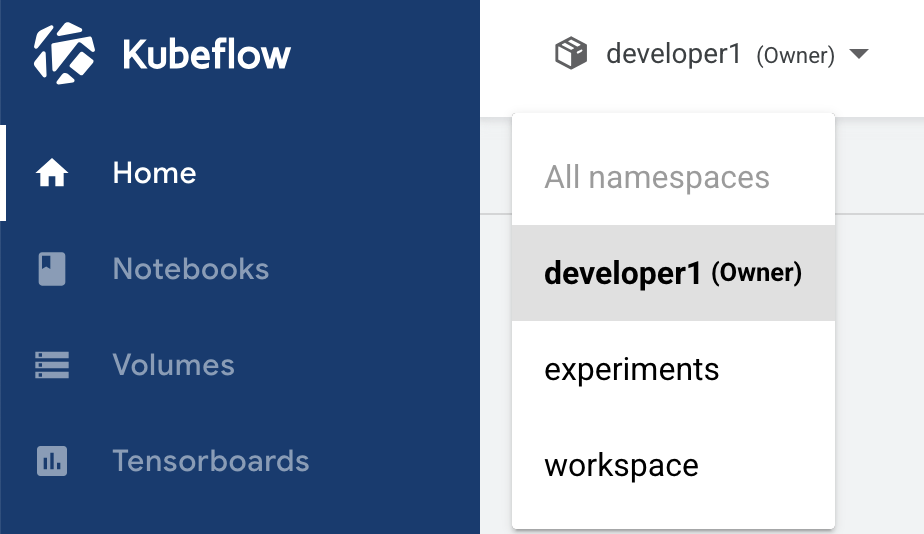
You can switch the active workspace by clicking on the workspace name and selecting the desired workspace from the dropdown list.
Access management⚓︎
Do not use the 'Manage Contributors' UI
The Kubeflow dashboard exposes a "Manage Contributors" menu item. This is a legacy feature and should not be used. Contributor management is handled exclusively by administrators in Keycloak. Changes made through the UI may be overwritten and can cause inconsistencies with the platform's access control.
To request access to a workspace, or to have a user added or removed, contact your platform administrator. Administrators manage workspace access by assigning Keycloak realm roles (pk:edit:<profile> for edit access, pk:view:<profile> for view access) as described in the IAM User Management documentation.