Access Management⚓︎
For in-cluster access management, the prokube platform uses role-based access control (RBAC) for most services. All possible roles are already configured in the prokube realm.
Realms⚓︎
A realm is a fundamental organizational unit that serves as a boundary for managing a set of users, roles, clients (most likely applications), and other resources. Each realm operates in isolation, ensuring users and configuration within one realm do not interfere with those in another realm. It's particularly useful for enterprise use cases and large organizations since it allows admin privileges at the realm level instead of system-wide admin privileges.
prokube Realm⚓︎
By default, the prokube platform comes with the master and prokube realms. All services are already connected to the prokube realm and are therefore ready to use. The master realm is used to give administrators the ability to create and manage realms. The in-realm configuration is authorized through realm roles and requires no access to the master realm.
prokube recommends reducing the number of users in the master realm as much as possible. Two or three admin users are more than enough since all in-realm configuration can be done by users within the realm.
The master admin user is meant to be used to create the first group of admin users. There is no need to configure anything else using the master admin user.
Furthermore, there are already two groups configured. One contains all realm roles required for user access to the cluster, and one for admin access.
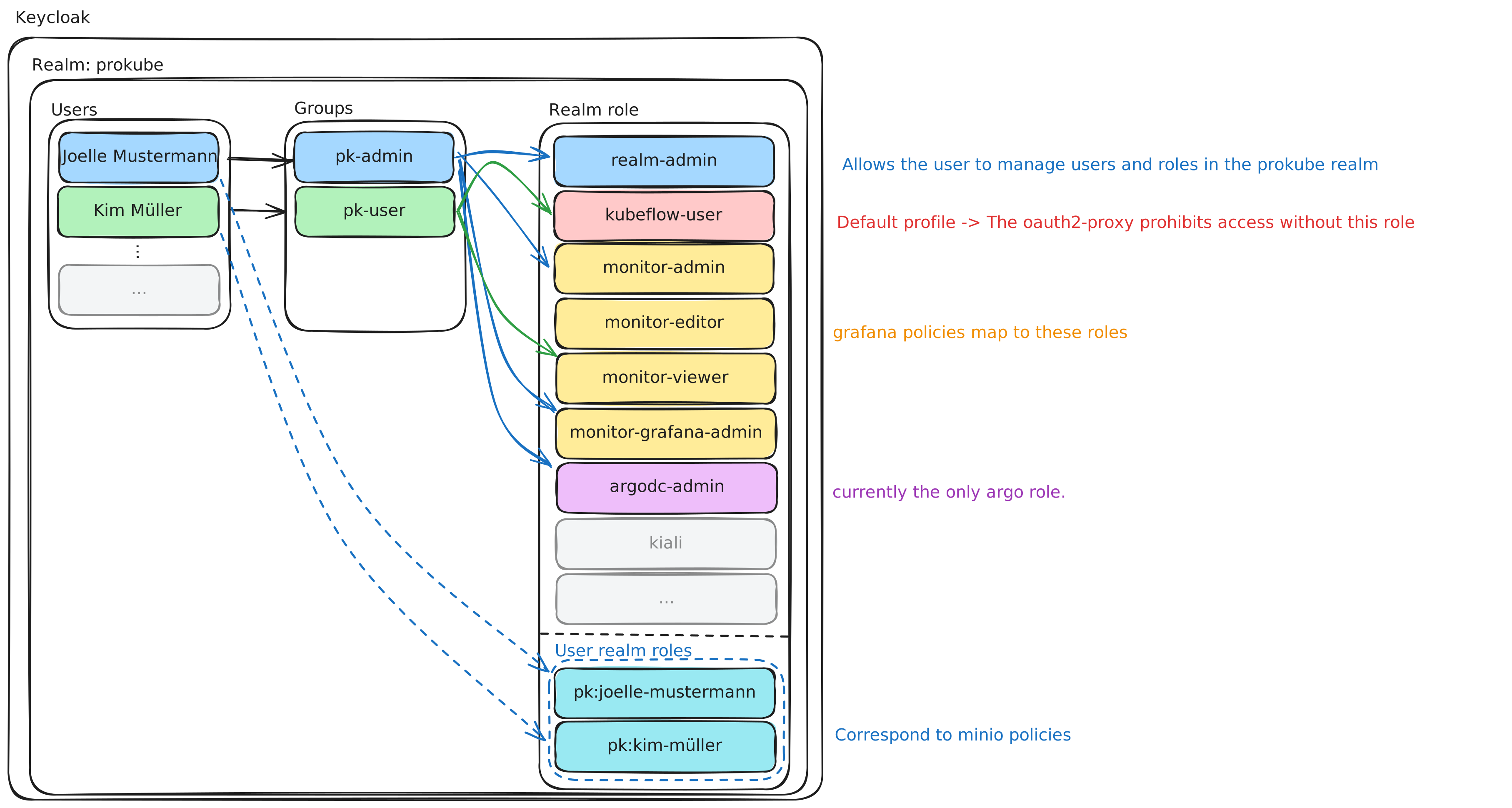
In the prokube platform, it is advisable to stick to the role-based access control pattern. Even though Keycloak can implement a variety of different access control patterns and even expand them, it is advisable to use Keycloak as described in this documentation.
Workspace Role Model⚓︎
Each workspace has a hierarchy of realm roles that governs compute access (Kubernetes RBAC, Istio network policies) and storage access (MinIO S3 buckets). This role hierarchy is created automatically when a user is created in Keycloak, but pk:<profile> roles can also be created standalone by an admin to provision a shared workspace not tied to any individual user.
Role Hierarchy⚓︎
pk:<profile>                         (workspace identity role)
  |
  |-- pk:edit:<profile>              (contributor edit access)
  |     \-- pk:s3:edit:<profile>     (S3 read-write, composite role)
  |
  |-- pk:view:<profile>              (contributor view access)
  |     \-- pk:s3:view:<profile>     (S3 read-only, composite role)
  |
  \-- pk:s3:edit:<profile>           (S3 read-write, also composite of workspace identity role)
Role Descriptions⚓︎
| Role | Purpose | Assigned To |
|---|---|---|
pk:<profile> |
Workspace identity role - identifies the workspace and triggers workspace provisioning | Created directly by admin to initialize a shared workspace; or automatically assigned to the user it was created for |
pk:edit:<profile> |
Edit access to the workspace (including edit S3 access) | Contributors who need to create, modify, and delete workloads |
pk:view:<profile> |
View access to the workspace (including view S3 access) | Contributors who only need read-only access |
pk:s3:edit:<profile> |
S3 read-write access to workspace buckets | Automatically effective for the associated user (if any) and edit contributors |
pk:s3:view:<profile> |
S3 read-only access to workspace buckets | Automatically effective for view contributors |
What happens if I assign a pk:... role to a user in Keycloak?⚓︎
| Keycloak Role | Kubernetes RBAC | Istio Access | MinIO S3 |
|---|---|---|---|
pk:<profile> |
kubeflow-edit in workspace namespace - create/modify workloads (falls back to pk:edit:<profile>) |
Allowed in workspace namespace | Read-write (via pk:s3:edit) |
pk:edit:<profile> |
kubeflow-edit in workspace namespace - create/modify workloads |
Allowed in workspace namespace | Read-write (via pk:s3:edit) |
pk:view:<profile> |
kubeflow-view in workspace namespace - read-only access |
Allowed in workspace namespace | Read-only (via pk:s3:view) |
pk:s3:edit:<profile> |
No RBAC | No access | Read-write |
pk:s3:view:<profile> |
No RBAC | No access | Read-only |
Contributors can read all Secrets in the workspace namespace
Both kubeflow-edit and kubeflow-view grant get/list on Kubernetes Secrets in the workspace namespace. This means every edit and view contributor can read all Secrets in a workspace — including credentials, tokens, and API keys created by other contributors. There is no per-user secret isolation within a workspace.
Keep this blast radius in mind when granting access. When onboarding a contributor (even view-only), assume they can read every secret currently in that workspace.
When a team needs to collaborate but members must not see each other's personal secrets, provision a dedicated shared workspace (a separate namespace) instead of adding contributors to a personal one. See the user-facing Secrets and tokens guidance.
Authentication Flow⚓︎
It is possible to customize the Authentication Flow. Please refer to the Keycloak Documentation for further insights.