MicroK8s Setup⚓︎
MicroK8s is a lightweight Kubernetes distribution from Canonical that prokube supports for self-managed deployments. It uses Calico for in-cluster networking and provides production-grade Kubernetes without the complexity of traditional setups. This document describes how to configure MicroK8s for prokube.
For guidance on when to use MicroK8s versus other Kubernetes distributions, see Deployment Options.
Initial setup⚓︎
Hint
This section is usually done using Ansible. It contains an overview of what needs
to be changed for prokube. To get the exact configuration please take a look at the
Ansible role install_microk8s.
We change some default settings in order to allow the cluster to run smoothly.
- Increase the ulimit so that applications can open many concurrent files
- Add proxy and no proxy configuration for containerd
- Increase the cluster IP range
- Increase the response timeout of the kubernetes API
Additionally, prokube uses some MicroK8s add-ons that need to be enabled.
- DNS
- RBAC
- GPU
- Metrics Server
- Ingress
For the CoreDNS add-on we also need to configure custom upstream DNS servers, if applicable. Otherwise, it will resolve the upstream DNS from the host.
Firewall configuration⚓︎
MicroK8s is using Calico for in-cluster networking. Once installed, you will see a lot of virtual network interfaces on each node. This is desired behavior, but in systems using firewalld or another strict firewall these are not able to reach the default gateway. So either we have to create a new zone or attach all cluster internal network interfaces to a more permissive zone.
Here is a firewalld example:
sudo firewall-cmd --zone=trusted --change-interface=cali+ --permanent
sudo firewall-cmd --reload
High availability⚓︎
MicroK8s supports HA out of the box. In clusters with more than three nodes, it is activated by default.
HA in MicroK8s⚓︎
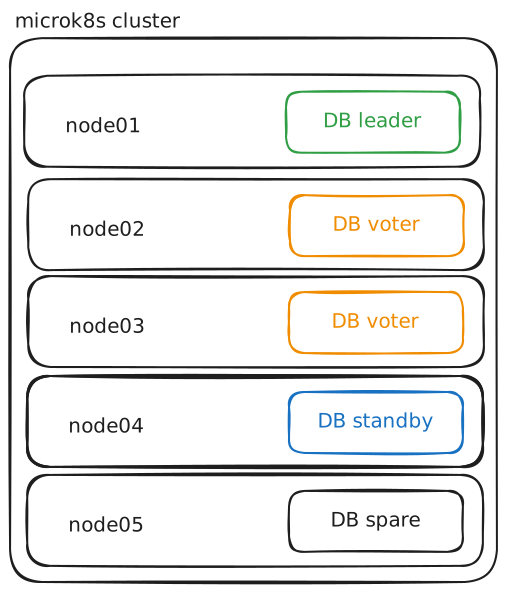
High availability (HA) ensures that the Kubernetes control plane and its data store remain operational even if some nodes fail. When HA is enabled, MicroK8s automatically forms a cluster with multiple control plane nodes and sets up distributed data storage (dqlite) so that control plane state is resilient to outages. Workload scheduling (Pods, Deployments) is handled by Kubernetes itself and is spread across all available worker nodes.
Note that you will need to configure a load balancer separately to enable external access to services; see your cloud provider documentation or projects such as MetalLB for details.
microk8s is running
high-availability: yes
  datastore master nodes: 10.1.0.10:19001 10.1.0.11:19001 10.1.0.12:19001
  datastore standby nodes: none
Distributed Storage⚓︎
For distributed storage, prokube is using Mayastor.
Load Balancing⚓︎
Load balancing external access is not included by default in MicroK8s. Use your existing load balancer if possible, or deploy MetalLB within the cluster.
Manage admin users⚓︎
The existing admin user is created during installation of MicroK8s. The token is
stored in /var/snap/microk8s/current/credentials/known_tokens.csv. You can
create a new user by adding a new line to this file. The format is
token,username,"system:masters". You can then use this token to authenticate
as the new user. token can be any string, username is the username you want
to create.
You can also delete an existing user by removing the line from the file.
Afterwards, you will need to restart the MicroK8s service:
microk8s stop
microk8s start
On multi-node clusters, you will need to do this on all nodes (it's probably best to first stop all nodes, edit the files, and then start them all again).